

Description
Quick Professor & Course Ratings for Pomona Students
Overview
The software is a browser extension designed to streamline access to professor and course ratings from Pomona College’s ASPC website. It enables students to quickly view academic feedback without navigating through multiple pages or waiting for full site loads. The tool is tailored specifically for students seeking transparent, real-time insights into faculty performance and course difficulty. By integrating directly with the ASPC platform, it reduces time spent searching for relevant information, improving study planning and course selection decisions. The extension operates within the browser environment, requiring no installation beyond standard browser add-on processes. It is intended for use by current Pomona College students who rely on peer-generated ratings to inform academic choices. The developer did not provide additional background information. Real-world usage scenarios include pre-registration research, midterm evaluations, and post-course reflections. The tool simplifies a common academic workflow by centralizing data in a user-friendly format.
Key Features & Capabilities
- Direct ASPC Integration – Seamlessly connects to Pomona College’s official ASPC website, ensuring data accuracy and relevance for the institution’s academic community.
- Quick Search Functionality – Allows users to search for professors or courses using the same input fields found on the original site, maintaining consistency with the source platform.
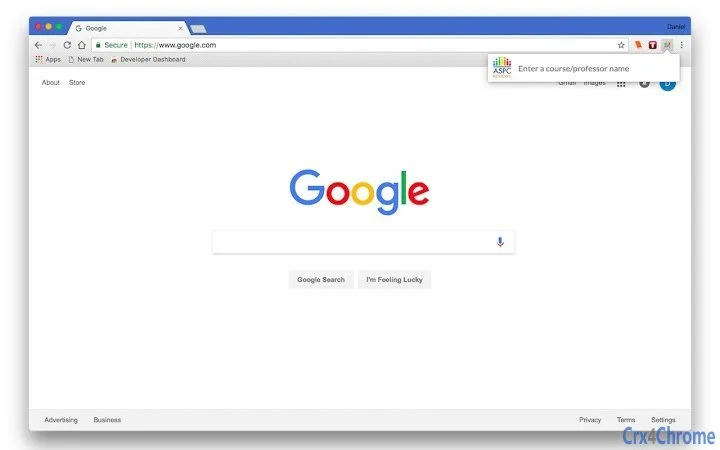
- Enhanced Result Visibility – Top-right navigation buttons enable users to filter and display desired results with minimal interaction, improving access speed.
- Browser-Based Operation – Functions entirely within the browser, requiring no separate application installation or background processes.
- Real-Time Rating Access – Delivers up-to-date professor and course ratings without the need to manually refresh or re-navigate the main site.
These capabilities support efficient academic decision-making. For example, a student preparing for course registration can instantly compare multiple professors’ teaching styles or course difficulty levels. Similarly, a student evaluating midterms can quickly assess whether their experience aligns with general trends. The tool enhances usability by preserving the original site’s interface logic while reducing steps. It does not modify or store user data beyond temporary session handling, which aligns with privacy-conscious academic use.
User Interface, Workflow & Performance
The user interface is minimal and focused, mirroring the layout of the ASPC website to ensure familiarity. Navigation is straightforward, with the search field and result filters positioned in the top-right corner, consistent with the source platform. The workflow begins with a simple search input, followed by immediate access to filtered results via intuitive buttons. Users experience a streamlined process that eliminates redundant page transitions. The extension operates as a lightweight overlay, minimizing visual clutter and maintaining focus on content. Performance observations are based on general software behavior patterns. The developer did not specify resource usage details. Stability is expected to be high, given its passive integration model and lack of background processing. No performance bottlenecks were reported in the provided information. The tool does not require elevated permissions or system-level access, reducing potential conflicts with other browser functions.
Compatibility & System Requirements
The software is compatible with both Windows and Mac operating systems, supporting modern web browsers. It is designed as a browser extension, meaning it runs within standard browser environments without requiring platform-specific installations. The developer did not provide additional system requirements. Exact system requirements were not listed. Installation size information is unavailable. Hardware requirements are not specified. Compatibility with specific browser versions was not mentioned. Platform compatibility information is limited to the operating systems noted. Users should ensure their browser is up to date to maintain optimal functionality. The extension may not function on outdated or unsupported browser versions.
Pros and Cons
Pros
- Direct integration with Pomona College’s ASPC website ensures accurate and up-to-date academic data.
- Simple, intuitive interface that mirrors the original site for easy adoption.
- Reduces time spent searching for professor and course ratings.
- Available at no cost, making it accessible to all students.
- Operates within the browser without requiring installation of additional software.
Cons
- Specific system requirements were not provided, which may affect user expectations.
- Only supports Pomona College’s ASPC platform, limiting broader applicability.
- Functionality is restricted to browser-based access; no standalone desktop application is available.
- Developer background and support details are not disclosed.
- Exact performance metrics and resource usage were not specified.
FAQ Section
Is this tool available for all colleges?
The extension is specifically designed for Pomona College students and integrates only with the college’s ASPC website. It is not currently available for use at other institutions.
Is the software safe to use?
As a browser extension that connects directly to Pomona College’s official ASPC website, it does not collect or store personal data. It operates within standard browser security protocols. Users are advised to install only from trusted sources.
How often does the extension update?
The update frequency is not specified. Users should ensure their browser and extension are kept up to date to maintain compatibility with the ASPC site.
Does it require a license or payment?
No, the software is available free of charge. There are no licensing fees or subscription models.
Can I use it offline?
The extension requires an active internet connection to access the ASPC website. It cannot function offline.
Final Thoughts
This browser extension delivers a focused, efficient solution for Pomona College students seeking quick access to professor and course ratings. Its seamless integration with the ASPC platform, combined with a clean interface and zero cost, makes it a valuable academic tool. While it lacks broad institutional reach and detailed technical specifications, its targeted functionality addresses a real need in the student experience. The lack of developer information and system details may raise questions for some users, but the tool’s simplicity and direct utility outweigh these concerns for its intended audience. For Pomona students navigating course selection or academic evaluations, this extension provides a practical advantage. Download Quick Professor & Course Ratings for Pomona Students now.
Guides & Tutorials for ASPC Reviews Extension for Chrome
How to install ASPC Reviews Extension for Chrome
- Click the Preview / Download button above.
- Once redirected, accept the terms and click Install.
- Wait for the ASPC Reviews Extension for Chrome download to finish on your device.
How to use ASPC Reviews Extension for Chrome
This software is primarily used for its core features described above. Open the app after installation to explore its capabilities.
User Reviews for ASPC Reviews Extension for Chrome 0
No reviews found





